| このゲームに一票! |   (18 投票, 平均: 3.11 / 5) (18 投票, 平均: 3.11 / 5) 読み込み中... 読み込み中... |
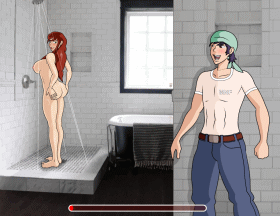
『こち亀』の秋本・カトリーヌ・麗子風の美女の服を脱がせたり、エッチないたずらをするゲームです!

まずはスカートをまくり上げて、
下着だけにしましょう~

この先はもっとエロい展開が!

コメント一覧
-
4646446646767644.449949497946468661640062862685065 より:
Requested) How to Download Render96 on The Pc. (For Dummies)
(Disclaimer: Mac, Linux, Android, And Switch Will Not Be Included in This Tutorial.)(Part 1) How to Download Render96 into your pc.
First things first, you got to download the base models and textures
TEXTURES: GitHub – pokeheadroom/RENDER96-HD-TEXTURE-PACK: we’d like to think of this texture pack as a resource also, if you want to give sm64 your own look feel free to use these as a base for accuracy, just credit them render96 boys & girls (go to the ‘code’ option, and then click where it says, ‘download zip’.)
(Latest Version) BASE MODELS: GitHub – Render96/ModelPack: Dynos model swap (on the right of your screen, you should see a category called ‘releases’, click the ‘3.2’ option. then download the 3.2 dyno zip.)
2. DOWNLOAD THE SOURCE (or sm64 port) : GitHub – Render96/Render96ex: Fork of https://github.com/sm64-port/sm64-port with additional features.(on the left of your screen, there should be a switch option called ‘master’, click on it and it’ll give you a list of options on which source you want to download. in order for the models to work on your sm64 port, you got to click on the option that can be either ‘alpha’ or ‘tester_rt64alpha’ and then click on code. and download zip.)
3. well, i can’t exactly tell you how to download baserom.us.z64 for good reasons, so I’ll let y’all figure it out. but it is required for the sm64 port too work.
4. Now, download the sm64pcbuilder2
DOWNLOAD: sm64pcBuilder2 (click the big ‘DOWNLOAD HERE’ link. when its downloaded, extract the file and open the file till you find an application called ‘sm64pcbuilder2’)
5. open the application, and it opens a command prompt that will code itself so the sm64pcbuilder can open (if it asks you to update the MSYS2 or ask you to update some things, then always press ‘y’ to continue the process.)
6. ill open the sm64pcbuilder, then it will tell you to download the source. then click the source (or sm64 port) that you downloaded at step 2 and click download. then it’s going to download itself in the command prompt (Note: it’ll take more than 30 minutes for it to be complete)
7. when it’s done, add the dyno model pack (you can do that by going in the ‘dyno’ option where it says, ‘add model package’ and choose the dyno model file you downloaded earlier)
8. go to the ‘textures’ option, and choose any kind of textures it has to offer by clicking download.
9. if everything is complete, launch the game and open a new game.
10. last but not least, open the settings (by pressing backspace) and open the dyno menu by pressing the K key and go down where it says ‘models’ and press L so it can open the option. then press the ‘3.2 models’ option and you should see the game being updated.
11. go back by pressing the ‘space’ key twice and enjoy!
If you have any questions, ask them in the comments section
-
管理人 より:
コメントありがとうございます
リンク切れを修正しました! -
できません
-
うんちっ
-
画面が変わってるけどなかなかヌードに出来ないや。
SEXしたい外国人
欧米人
フランス人
西洋人
ロシア人
朝鮮半島の人 -
射精できんのかい

≪PR≫
◎こちらのエロゲームもおすすめ!










≪PR≫
|
 |
 |



















コメント挿入欄